
Reading long documents on a phone or computer can be tiring, particularly when the material contains academic references, footnotes, tables, mathematical equations, figures, or complex formatting. For people who prefer listening to information—or who rely on audio because of visual, learning, or reading-related barriers—text-to-speech can make a significant difference.
Paper2Audio – Text to Speech is an Android application designed specifically around this problem. Rather than simply reading every piece of text on a page from beginning to end, Paper2Audio is designed to process documents intelligently and turn them into more natural, useful audio.
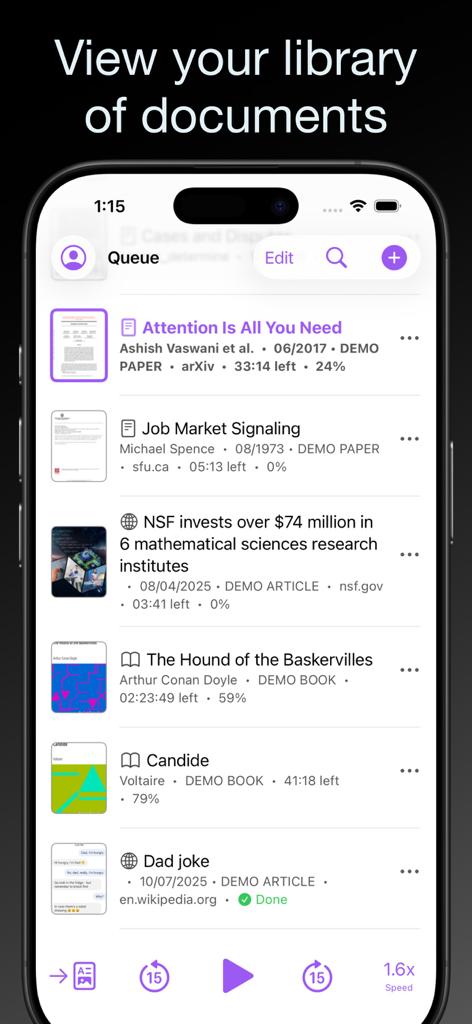
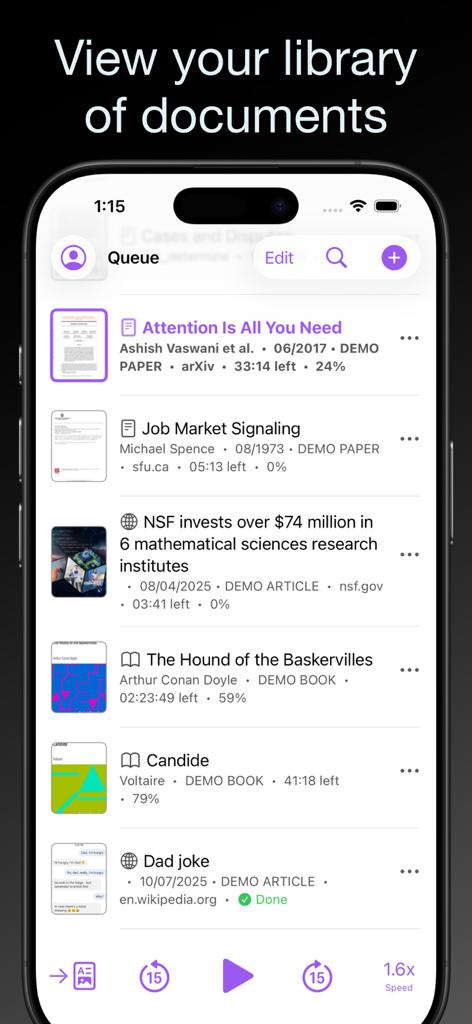
The application can read PDFs, research papers, EPUB books, web articles, Word documents, scanned documents, plain text, and other content. It also provides features for summaries, visual elements, navigation, highlighting, notes, playback-speed control, and screen-reader compatibility.
At the time of writing, the Google Play listing shows 4.8 stars from more than 660 reviews and 10K+ downloads. The application is rated “Everyone” and was most recently updated on August 22, 2026.
Listen to this article
Loading voices…
follow us on telegram
Join our Telegram Channel (opens in new TabWhere to Find Paper2Audio?
Android:
Download Paper 2 Audio from Google PlayStore (Opens in new Tab)Official website
Click to visit the official website of Paper 2 Audio (Opens in new Tab)What Is Paper2Audio?
Paper2Audio is a text-to-speech application developed to turn written documents into audio that users can listen to instead of reading everything visually.
The developer describes it as a tool for academic and professional documents rather than simply a conventional text-to-speech reader. It is designed to handle material such as research papers, books, legal documents, reports, web articles, forms, slides, and Word documents.
This distinction is important.
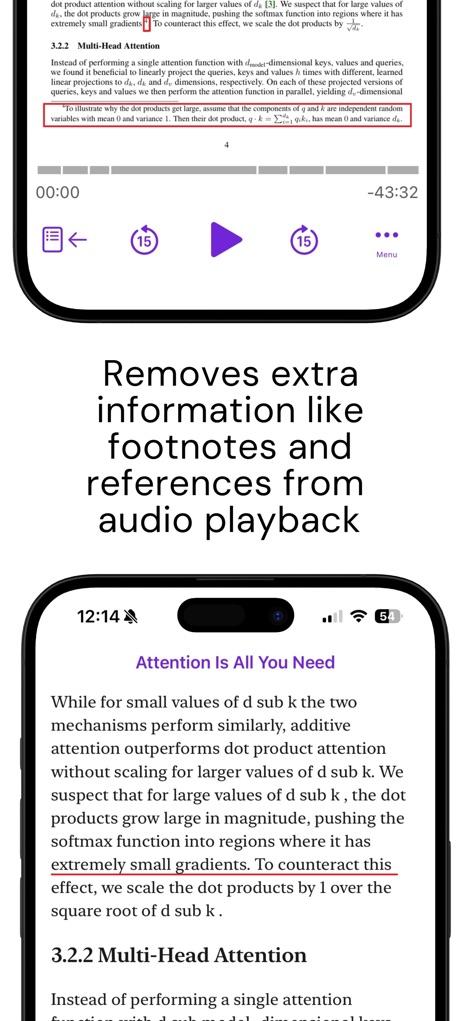
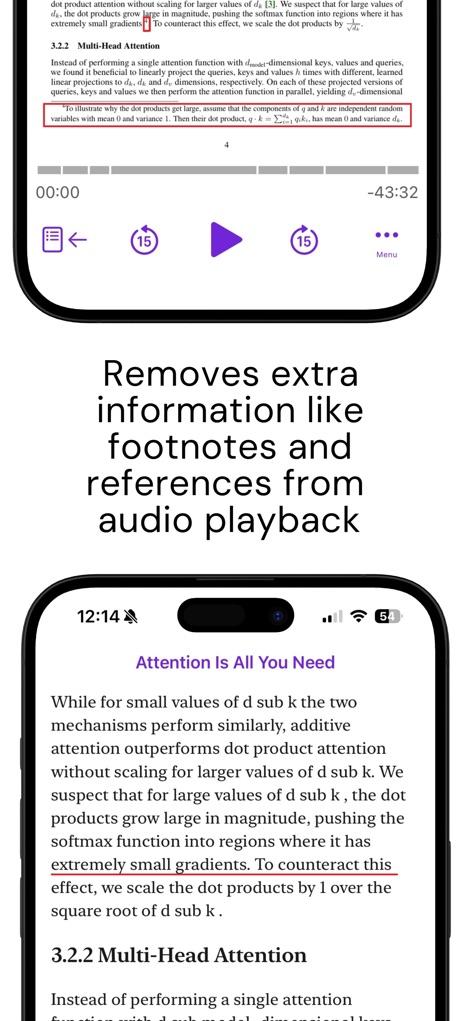
Traditional text-to-speech systems often treat a document as a continuous stream of characters. As a result, a user listening to a PDF might hear page numbers, headers, footers, citations, footnotes, or other material that isn’t actually part of the main text.
Paper2Audio attempts to identify and remove this kind of clutter before generating the audio.
The result is intended to feel more like listening to an audiobook than listening to a computer read the raw contents of a PDF.
Supported Documents and Content
Paper2Audio supports a broad range of formats and sources.
According to the Google Play listing, users can work with:
- PDF documents
- Research papers
- EPUB books
- Web pages and articles
- Microsoft Word .docx files
- .txt files
- Scanned documents
- Copy-pasted text
The official website additionally highlights legal documents, slides, forms, PDF books, and other professional materials.
This makes the application particularly interesting for people who regularly work with large amounts of written information.
For example, a student could convert a research paper into audio and listen while travelling. A lawyer could listen to a lengthy legal document while away from the desk. A researcher could review papers while walking or commuting. A blind user could use the application as an alternative way of consuming documents that might otherwise be difficult to access.
What Makes Paper2Audio Different From Ordinary TTS?
One of Paper2Audio’s most interesting features is its attempt to understand the structure of a document.
Instead of blindly reading everything it encounters, the application can remove unnecessary content such as page numbers, reference lists, citations, advertisements, and other non-essential material.
This is particularly useful for academic papers.
Imagine listening to a 30-page research paper using a conventional text-to-speech engine. You could repeatedly hear things such as:
“Page 12.”
“Smith et al., 2018.”
“Figure 3.”
“Journal of…”
Then the actual paragraph continues.
Paper2Audio is designed to make this experience cleaner by concentrating on the meaningful content.
Handling Tables, Figures and Mathematical Content
Academic and professional documents aren’t made up only of ordinary paragraphs.
Research papers can contain mathematical equations, tables, diagrams, figures, programming code, and other visual information. Reading these elements literally through a conventional TTS engine can produce confusing audio.
Paper2Audio takes a different approach.
Its Google Play description says the application can summarize equations, code, tables and figures in plain language, rather than simply narrating symbols one by one.
The official website similarly describes its visual-element processing as providing summaries of tables, figures, and mathematical content.
This could be especially useful when listening to research papers because the goal isn’t necessarily to hear every visual element reproduced verbally. Instead, the user can receive an understandable description of what the element represents.
The application has also continued to improve this functionality. Recent updates have included improvements to PDF footnotes, reading order, journal metadata, and the handling of tables, mathematics, code, and figures.
AI Summaries and Different Listening Levels
Paper2Audio isn’t limited to reading an entire document word for word.
The official FAQ says users can select different audio types, including:
- Full Text
- Long Summary Short Summary
Users can also choose an optional context level.
This gives the application another useful dimension.
If you need to study a document carefully, you can listen to the full text. If you only want to understand the central argument of a long paper before deciding whether it deserves closer attention, a summary may be more appropriate.
This can be particularly valuable for researchers and students who routinely have more reading material than they have time to read.
Reader View and Text Highlighting
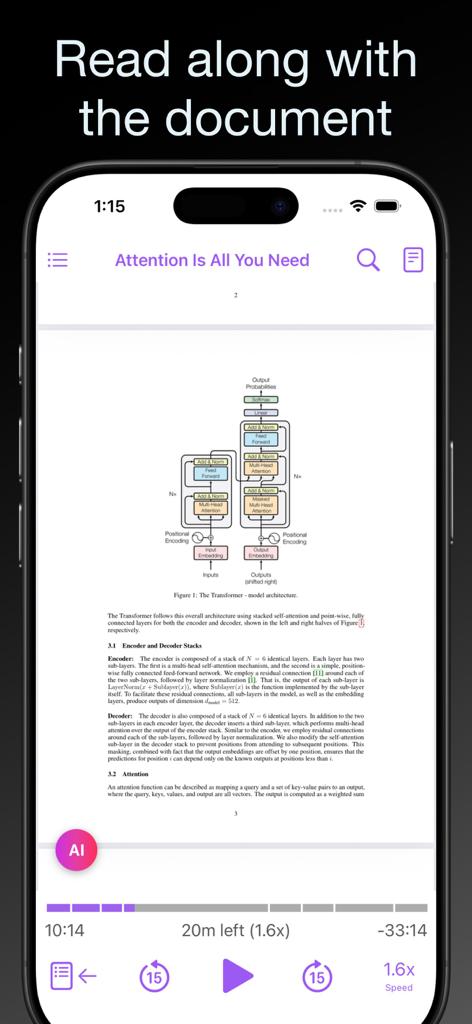
Paper2Audio also provides a Reader View that allows users to follow along with the audio.
The application reformats documents for easier reading and displays text, images, mathematics, formatting, and word-level highlighting synchronized with the audio.
Users can also highlight text and add notes.
This creates a useful combination of reading and listening rather than forcing users to choose one or the other.
For example, a student could listen to a chapter while following the highlighted text and then save an important paragraph as a note.
Different users have different listening speeds.
Some people prefer slow narration because they are learning unfamiliar material. Others are comfortable listening significantly faster than normal speech.
Paper2Audio provides playback-speed control from 0.5× to 4×, with adjustments available in 0.05× increments.
The application also includes features such as a sleep timer, table-of-contents navigation, text search, automatic playback of the next document, and lock-screen/headphone controls.
These features make the application feel closer to a dedicated audiobook player than a basic text-to-speech utility.
Accessibility for Blind and Low-Vision Users
Accessibility is one of the areas where Paper2Audio becomes particularly interesting.
The developer explicitly states that the application is screen-reader compatible and supports accessibility-focused fonts such as Atkinson Hyperlegible and OpenDyslexic.
The official FAQ specifically states that Paper2Audio works with both TalkBack on Android and VoiceOver on iOS. The developer says that controls are labeled for screen readers and that important player controls remain available when a screen reader is active.
This is significant because accessibility isn’t simply about converting text into speech. The application itself also needs to be navigable.
For a blind user, an application that generates excellent audio but contains unlabeled buttons or inaccessible controls can still be difficult to use. Paper2Audio appears to have deliberately considered this aspect of its interface.
There is also independent accessibility testing. Accessible Android’s review found Paper2Audio to be largely accessible with a screen reader, while noting some limitations, including screen-reader navigation issues with headings and links and uncertainty about selected-state announcements in some parts of the interface.
That means the application shouldn’t be described as “perfectly accessible.” A more accurate description is that accessibility is a clear development priority, while some areas can still be improved.
Useful for Dyslexia and Other Reading Challenges
Paper2Audio isn’t designed exclusively for blind users.
The Google Play listing specifically mentions users with visual impairments as well as people with learning challenges such as dyslexia and ADHD.
The user reviews reinforce this point.
One Google Play reviewer described the application as particularly helpful for dyslexia and for listening to their own writing. Another user said that the application helped them with reading difficulties associated with ADHD.
The official website also identifies people with accessibility needs among its target users, alongside professors, researchers, doctors, lawyers, students, and other professionals.
Free Plan
One of Paper2Audio’s strongest selling points is its free plan.
According to the Google Play listing and the official website, the free version provides up to 56 hours of audio generation per week and does not include conventional advertising or paywalled voices.
That is a substantial allowance for a free text-to-speech service.
The company also offers Paper2Audio Plus, a paid option aimed at business and power users. The paid tier provides higher usage limits and audio-file export capabilities.
The distinction is therefore relatively straightforward: ordinary users can make substantial use of the free service, while people with heavier document-processing requirements can consider the paid plan.
Offline Listening
Another useful feature is the ability to download generated audio for later listening.
This means that once a document has been processed, users can listen without maintaining an active internet connection. A Google Play reviewer specifically praised this capability, saying that generated audio could be downloaded directly to the device and listened to offline.
For people who travel through areas with unreliable connectivity, this can be particularly useful.
It also changes the way the application can fit into a person’s daily routine: a document can be prepared when connected to the internet and consumed later while travelling, walking, exercising, or doing household tasks.
Cross-Platform Synchronization
Paper2Audio isn’t limited to Android.
The official website provides access through the web, iOS, and Android, with the user’s document library and listening progress synchronized across platforms.
The company also provides browser extensions for Chrome, Firefox, and Edge, allowing users to add documents and web pages to their Paper2Audio library directly from a browser.
This cross-platform approach could be particularly useful for people who work on documents on a computer but listen to them on a smartphone.
What Do Users Say?
The current Google Play listing shows a 4.8-star rating from more than 660 reviews, indicating a strongly positive reception among Android users.
Several recent reviews praise the natural-sounding voices, the absence of intrusive advertising, the free weekly allowance, and the application’s ability to handle long documents.
One reviewer reported using Paper2Audio to listen to a three-hour book without encountering advertising. Another praised the application for helping with dyslexia and listening to written work. A further reviewer specifically mentioned improvements to the display of images in EPUB files after an update.
The wider App Store review history is also strongly positive, with users praising its handling of EPUB books, research papers, offline listening, natural voices, and AI-generated summaries.
However, there is also useful criticism. Independent accessibility testing has identified some screen-reader limitations, while individual users have reported compatibility questions with custom EPUB files. Interestingly, the developer has responded directly to these concerns and invited users to contact the team so that the issues can be investigated.
That responsiveness is worth noting because accessibility improves not only through design but also through listening to users who encounter barriers.
Who Is Paper2Audio Best For?
Paper2Audio could be particularly useful for several groups.
- Students:
Students who need to work through large textbooks, research papers, lecture materials, or other documents can turn reading material into audio and listen while travelling or doing other activities.
- Researchers and Academics
Research papers are one of the application’s strongest use cases. Its ability to remove references and other clutter while handling tables, figures, equations, and document structure makes it particularly suited to academic material.
- Lawyers and Professionals
Legal documents, reports, contracts, forms, and other professional documents can be consumed through audio, potentially making it easier to review large amounts of information away from a desk.
- Blind and Low-Vision Users
Screen-reader compatibility, accessible fonts, synchronized highlighting, document processing, and audio-first consumption make Paper2Audio an interesting tool for people who cannot—or prefer not to—consume lengthy documents visually.
- People With Dyslexia or ADHD
Users who find sustained visual reading difficult may benefit from hearing documents while following along visually when desired.
- Anyone Who Wants to Read More
Perhaps the broadest audience is simply people who have more documents than time.
Instead of waiting for a quiet hour to sit down and read a long paper, a person can listen while commuting, exercising, walking, or completing routine tasks.
Who Develops Paper2Audio?
Paper2Audio is developed by PerfectRec Inc.
The company’s public story is somewhat unusual.
According to a message from founder Joe Golden, PerfectRec was founded in 2022 as a product recommendation company focused on helping people choose electronics such as laptops and smartphones. Golden says that the original business did not become successful and that he subsequently pivoted the company toward Paper2Audio.
This background helps explain why the current Paper2Audio product is operated by a company whose original focus was quite different.
The company appears to have moved from product recommendation technology toward document processing, AI-assisted text-to-speech, and accessibility-oriented reading technology.
The official Paper2Audio website now positions the product around academic and professional documents and says that its technology is intended for users ranging from students and professors to lawyers, engineers, researchers, and people with accessibility needs.
Privacy and Data Safety
Privacy is an important consideration for an application that processes documents, particularly when those documents may contain academic research, legal information, personal writing, or business material.
Google Play currently states that Paper2Audio does not share data with third parties, while indicating that the application may collect personal information, audio, and other categories of data. Google also states that data is encrypted in transit and that users can request deletion of their data.
The application’s terms of service identify PerfectRec Inc. as the company operating the Paper2Audio service.
Users handling confidential or sensitive documents should nevertheless review the current privacy policy and terms before uploading such material. This is especially important for legal, medical, corporate, or unpublished research documents.
Recent Development
Paper2Audio appears to be actively developed.
The Google Play listing shows an update dated August 22, 2026, with improvements including new Library, Add, and Settings tabs; queue, archived, and all-document views; search, sorting and filtering; redesigned menus and a mini-player; improved document processing; and automatic re-downloading of missing audio.
Earlier updates have also included improvements to TalkBack behavior, PDF reading order, footnotes, journal metadata, language support, text selection, bookmarks, and visual-element handling.
The frequency and nature of these updates suggest that Paper2Audio is still evolving rather than being a static application.
Contact Developers:
For any technical help, please send Email message directly via the following Email address
Click this to send Email for Developers (opens in your default Email app)
Leave a Reply